
Stage 1 · Frame extraction and MySQL storage
Turning raw aquarium video into a structured, frame-level dataset with persistent metadata.
Abstract
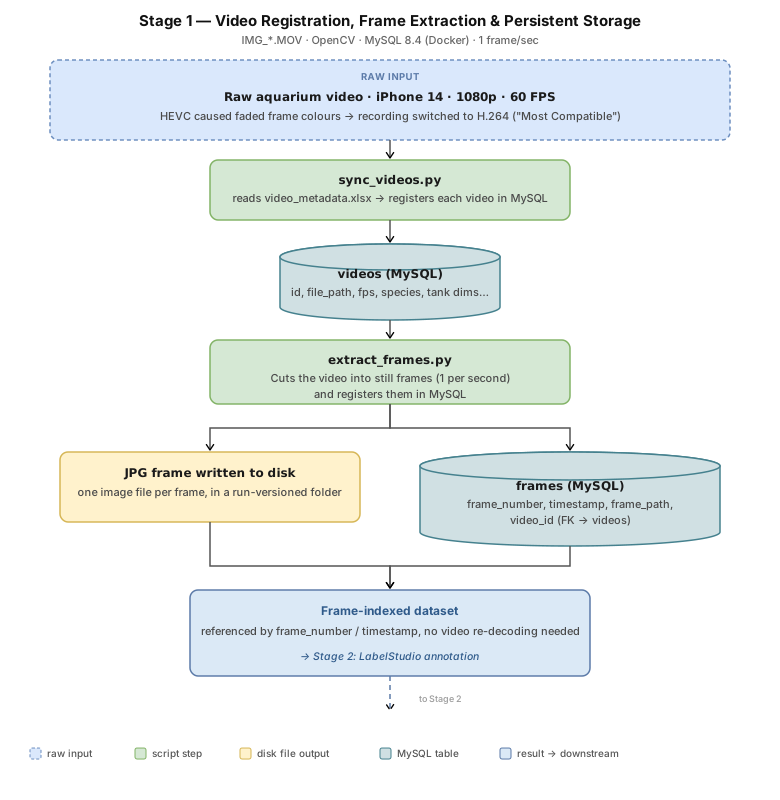
Stage 1 converts raw aquarium video into a structured, frame-level MySQL dataset in
two steps: each video is registered once, along with its metadata, in a MySQL videos table, then
sampled at one frame per second into a frames table foreign-keyed back to
it, so each frame stays traceable to the video it came from. The result is a reproducible ingestion layer: consistent
1 FPS (frames per second) sampling, JPG frames on disk, and structured metadata across
two relational tables in a Dockerised MySQL database, forming the foundation
the annotation and training stages build on.
Introduction
Section titled “Introduction”AquaMind measures fish behaviour from video, but the first model in the pipeline, the object detector, learns from still images, not from a continuously playing file. Bounding boxes are drawn on single frames, and each label must be attached to the frame it belongs to, so frames need to be findable again later by frame number.
A folder of image files does not give that. It says nothing about which video a frame came from, what the tank and the fish were like when it was filmed, or at what rate it was sampled, and those details are needed later to interpret a model’s results and to rebuild a dataset. There is also a matter of scale: at 60 frames per second a video holds thousands of near-identical frames, and every frame that is kept has to be labelled by hand, so how many to keep matters.
Stage 1 therefore turns each raw video into a small, addressable set of frames, with its metadata stored once and linked to every frame. This chapter describes how the videos were recorded, registered and sampled, and Stage 2 then labels the result.
Produce a frame-indexed dataset from each video, stored in a relational database, in which every frame is addressable by frame number and timestamp and linked to its video’s metadata, as the input for labelling in Stage 2.
Methods
Section titled “Methods”Pipeline overview
Section titled “Pipeline overview”Each video is registered once, then sampled into frames that are written both to disk and to MySQL, as traced in Fig. 1 below. The subsections that follow take the pipeline step by step: first the choice of recording format, then the two tables and the scripts that fill them.
Choosing a recording format
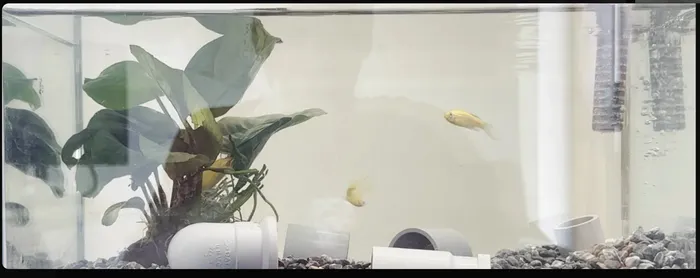
Section titled “Choosing a recording format”Initial recordings using iPhone 14 (iOS 26) in HEVC (H.265) format introduced frame-level colour inconsistencies when processed with OpenCV, resulting in degraded colour fidelity during extraction.
This issue comes from how inter-frame compression works: modern codecs store occasional full frames and encode only the pixel differences between them to reduce file size. When OpenCV’s software decoder processes an HEVC-encoded file, colour reconstruction can break down during this decoding process, producing washed-out frames.
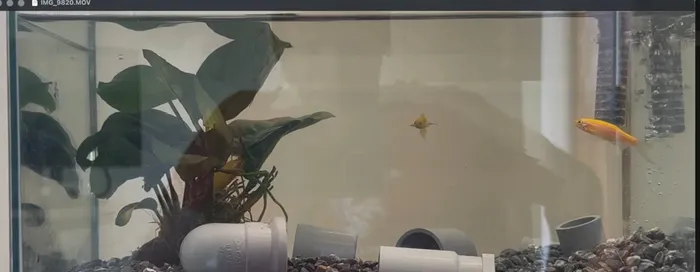
To ensure deterministic frame decoding, the recording format on iPhone was switched to H.264 (“Most Compatible” mode). Although this increased storage size, it significantly improved frame consistency and colour stability during extraction.
Recordings were standardised at 60 FPS to increase temporal resolution, enabling finer capture of fast behavioural events such as feeding strikes.
Setting up the database
Section titled “Setting up the database”A MySQL 8.4 instance runs inside a Docker container, isolated from any local database installation, with port 3306 exposed so both the Python scripts and MySQL Workbench can connect to it.
Stage 1 creates two relational tables: videos, one row per registered
recording, written by sync_videos.py, and frames, one row per extracted
frame, written by extract_frames.py and foreign-keyed back to its parent
video. Splitting registration from extraction this way means a video’s
metadata (species, tank dimensions, filming date) is recorded once, not
repeated on every one of its frame rows.
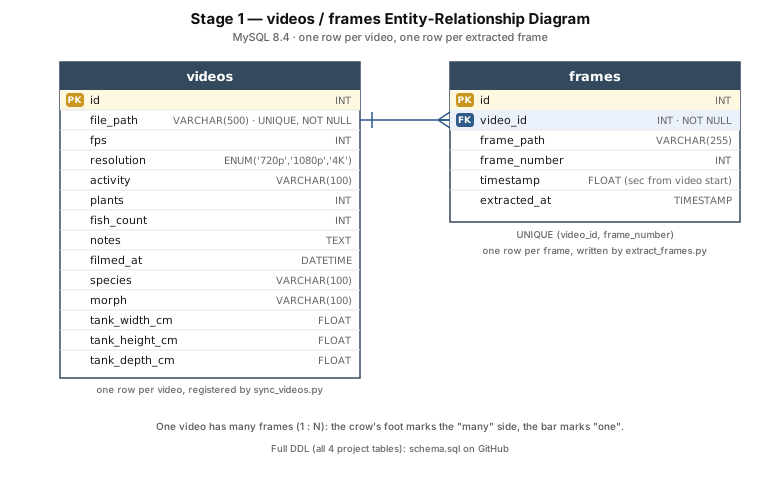
The full table definitions for all four of AquaMind’s MySQL tables (the two added by later
stages are covered where they’re introduced) is in
schema.sql
on GitHub which contains a clean, commented, structure-only file with no data, runnable
as-is against a fresh MySQL instances.
Registering videos
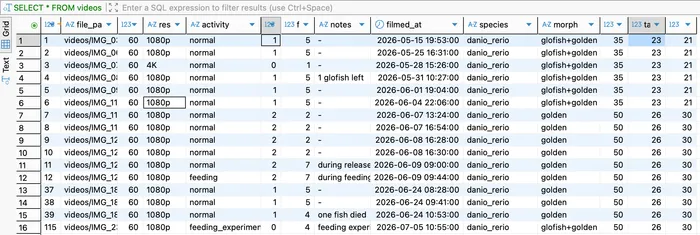
Section titled “Registering videos”sync_videos.py (flow diagram) reads one row per video from video_metadata.xlsx, filled in manually per
recording session: species, morph, tank dimensions, activity, fish count, and filming date, the
experimental metadata that isn’t in the video file itself. fps and
resolution are not taken from the spreadsheet; they’re read directly from
the video with OpenCV, so they can’t drift out of sync with the actual file.
The insert is an upsert keyed on file_path, so re-running the script is safe: an already-registered video gets
its metadata refreshed instead of duplicated.
Extracting frames
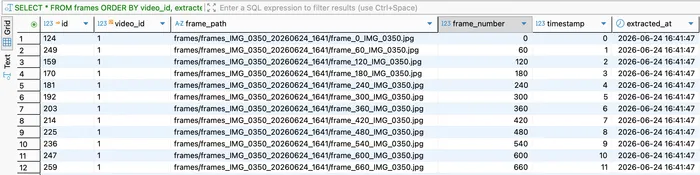
Section titled “Extracting frames”extract_frames.py (flow diagram) reads each video sequentially using OpenCV and
selects one frame per second by default (the sample rate is a config setting, and the reported FPS is
rounded because iPhone videos report values slightly below 60, such as 59.78). Each selected frame is
saved as a JPG to disk. The source video is already H.264-compressed, so lossless PNGs would add file
size without adding detail, and JPG is what LabelStudio and YOLO training read directly. In the same
step, it’s registered as a row in the frames table, storing its index, its timestamp, and the
frame_path pointing back to the JPG.
Results
Section titled “Results”Ingestion correctness was verified by querying videos and frames directly.
Discussion
Section titled “Discussion”Stage 1 turns raw videos into a queryable dataset. Each video is registered once in a videos
table, and its frames are decoded deterministically and saved as JPGs, with one row per
frame in a frames table. Frames are sampled at 1 per second by default (the rate is a script
parameter), a deliberate compromise. Consecutive frames at 60 FPS are nearly identical, and every
frame kept is one that must be labelled by hand, so a sparser sample gives more visual variety per
hour of annotation. The result is what Stage 2 needs: a clean,
addressable set of frames to load into the labelling tool, and database rows that each bounding box
can be joined back to.